JANUARY PROMOTION: Only $17 get Bonsai WordPress theme

LEARN MORE
-2833Days -15Hours -24Mins -11Secs
  • Home
  • Themes
    • Bonsai WP – $49 (Limited Sales $21)
    • Moonlight
      • Moonlight WP
      • Moonlight PSD
    • Kids
      • Kids WP
      • Kids PSD
    • Mercy
      • Mercy WP
      • Mercy – PSD
    • H Decor
      • Hdecor WP
      • H Decor – PSD
    • ASLAN
      • ASLAN
      • Aslan PSD
    • Lincoln
      • LINCOLN – Education WP Theme
      • LINCOLN – Education PSD
      • Lincoln HTML
    • Primary
      • PRIMARY – Kindergarten WP Theme
      • Primary PSD
      • PRIMARY – Kindergarten HTML
    • Jakiro
      • JAKIRO – Fashion Shop WP Theme
      • JAKIRO – Pretashop
      • Jakiro – Multi Store HTML Template
      • JAKIRO – Fashion Shop PSD
      • Jakiro – Virtuemart
      • Jakiro – HTML
      • Jakiro – Shopify Theme
    • Furion
      • FURION – Portfolio WP Theme
      • Furion – Responsive HTML
      • FURION – Creative PSD
    • Ink
      • INK – Magazine WP Theme
      • INK – Magazine PSD
    • Lucy
      • LUCY – Feminine HTML
      • LUCY – Multipurpose PSD
    • Knight
      • Knight – Corporate PSD
      • Knight – Shopify
    • Tower
      • TOWER – Business WP Theme
      • TOWER – Creative Business HTML
      • Tower – Business PSD
    • Platinum
      • PLATINUM – Webshop PSD
      • Platinum Prestashop
      • Platinum HTML
    • Neveda
      • NEVEDA – Fashion PSD
      • Neveda – eCommerce WP
    • Steve Cadey
      • STEVE CADEY – PSD
      • STEVE CADEY – WP
    • 1989
      • 1989 – PSD
  • Freebies
    • Summer Freebie packages
    • FOLIO – Portfolio HTML5
    • MYTHEMES – Cooking PSD
    • PAPER – Blog PSD
    • INSTAISM – Portfolio PSD
    • Breviter – PSD Template
    • Free Fonts Collected
    • Free Plugins Collected
    • Free Icon Collected
    • Free Mock-up Collected
  • Blog
    • News
    • Theme Collection
    • Tips and Tricks
    • Theme Release
    • Theme Updates
    • Freebies
    • Hot Deals
    • Change Logs
    • Customers’ Sites
      • Lincoln Sites
      • Furion Sites
      • Jakiro Sites
      • INK Sites
  • Services
    • Installation
    • Customization
    • Migration
    • PSD to WordPress
  • Support
    • Dedicated Ticket
    • Jakiro Dedicated support
    • FAQs
    • Contact Us

UX Guide to Customize WordPress Admin Dashboard

By Tracey Jones November 28, 2016 0

Not many WordPress users, especially the beginners to the platform, know that the website is great from both ends – front end (website interface) and back-end (admin interface).
WordPress admin dashboard is a thing of beauty that’s practically renowned for its user friendliness (UX) and sleekness. This one element has undergone many makeovers, but over all this time it has still retained its inherent usability.

Now WordPress pros might already be aware of the Screen Options button on their admin dashboard which will let them customize what to show or hide, but not the newbies.

In this post, I’ll share a few quick and easy ways for you to improve the UX of your WordPress admin dashboard, all by yourself; no coding necessary.

1. Menu items (Sidebar)

As a content marketer/ blog owner, you aren’t likely to use many of the purely technical settings and menu items available by default on WordPress admin dashboard.

And although I’m not discouraging you from learning how to use them, your own website/ blog isn’t something you should be taking risks with in order to learn by experimentation.

To this I say: Out of sight, out of mind. You can resist the temptation of fiddling around with settings you have no clear idea of by removing them from the admin dashboard altogether (not permanently, just until you learn your way around them).

In order to make this happen, go to ‘Screen Options’ page from your WordPress admin dashboard. This page (or screen) will show you a drop down menu which contains all the currently enlisted settings’ tabs in your WordPress dashboard. By default, it includes taxonomy (tags and categories), Comment moderation (queues and spam control), SEO (permalinks and SEO plugin settings), various post formats (as created by your theme), and so on. There you can easily remove all the menu items that are of no direct use to you on a day to day basis.

While you are there, make sure to reorder the settings’ tabs by order of priority or any other way that makes sense to you. For instance, if your primary concern is to publish content, make sure the publishing settings and SEO configuration screen are right on top. To do this, simply drag and drop the settings’ tabs to reorder them.

2. Comment Moderation Screen

Comments are essential for reader engagement. An appropriately active comment section is practically a sign of good, loyal, and most importantly, an opinionated readership. Add to that the fact that you can get the comments indexed by search engines, and you’ll see why so many blogs invite comments on their posts despite knowing that over 99% of it is going to be redundant and/or spam.

Disabling the comment section entirely is the cowards’ way out: so buck yourself up to deal with massive amounts of comment spam with plugins like Akismet, Jetpack, and WP SpamShield AntiSpam. Other than that, you can make moderation easier for yourself as an admin in times of heated debates.

This can be done by modifying default WordPress admin dashboard settings – simply go to Screen Options >> Comments >> Author >> In Response to. This will let you increase the number of comments visible to you at any given time in the comment moderation queue (‘Items per page’ setting)

3. Access Control

User Roles and Capabilities – aka WordPress’ own way to bring corporate hierarchy to online website management is pretty straightforward way to grant or restrict access to some of the more delicate site features to only those who are concerned with it. Even by default, it works well for many websites. But yours might not be one of them.

To fiddle around with User roles and capabilities, you need the User Role Plugin. This will let you easily customize and even create user roles and define the features they can access.

4. Admin Dashboard Plugins

Why would you think there won’t be a plugin that will let you customize your admin dashboard itself? Given below are some of the most commonly used (and free) WordPress dashboard customization plugins:
• R3DF Dashboard Language Switcher
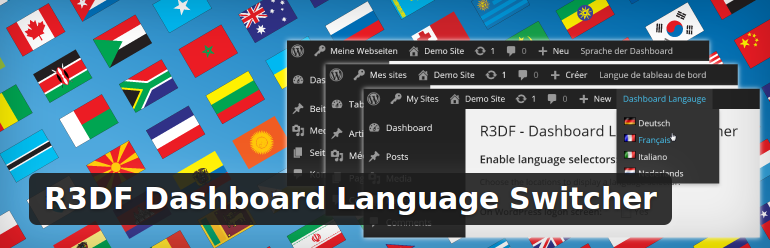
r3df-dashboard-language-switcher-uxguide
This one is a simple plugin which does what it says on the tin – gives your backend managers/ executives a way to switch the dashboard interface language to one of their choices.

R3DF is multisite compatible and basically just adds a language switching option on your admin dashboard, login screen, and user profiles for all users. Keep in mind that the plugin itself won’t translate the interface: you have to add those manually by visiting your General Site settings screen and installing the core translations. Also: since themes and plugins need to have those exact same translations for their settings interface to be translated or they’ll show up in plain English.

• Mojo Admin Toolbox
the-mojo-admin-toolbox
This one is fairly popular with WordPress development companies and freelance developers who create entire sites from ground up to client’s exact specifications. Mojo Admin Toolbox lets a developer (or anyone with a little experience with WordPress settings) customize the dashboard screen.

You can hide/show comment moderation queues, add/ remove admin dashboard widgets (works with user roles), hide/ show specific settings within the main tab (user role compatible), edit dashboard footers, and more.

• WPBizPlugins Custom Admin Help Boxes
wpbizplugins-custom-admin-help-boxes
Another perfect tool for WordPress customization companies or freelance developers is WPBizPlugins Custom Admin Help boxes.

The plugin will let you (the developer) add a set of custom instructions for the intended dashboard users, which can be a huge help if they aren’t exactly tech-savvy and it falls on the developer’s head to familiarize them with the system. The instructions can be added and edited over default instructions and help box texts. You can also add them as rich media (images, audios, videos, etc.) tutorials, along with links to support forums or helpdesk.

Endnote

And this is just the beginning of the extent to which you can customize your WordPress admin dashboard. You can also white label (rebrand) the dashboard and login screens (See plugins like Ultimate Branding for that exact purpose), add custom welcome message (replace the old-school ‘Howdy!’ to something more fitting with your own culture), or even ask your developer to jazz it up with WordPress dashboard themes.

Now you know what we mean when we say WordPress is flexible.

Category: General Tips and Tricks Tags: learning wordpress wordpress tips
SHARING:
  • Divider With No Text
PREVIOUS POST The Ultimate WordPress Tutorial on Caching
NEXT POST The Advantages of Choosing Linux Web Hosting
avatar
About The Author: Tracey Jones
Tracey Jones describes her self as a, expert web developer who is specialized in converting PSD to WordPress theme in an efficient manner. She is passionate about learning something new, sharing her knowledge with others through her informational blogs and articles.
single-banner

Leave a Reply Cancel reply

Your email address will not be published. Required fields are marked *

MOST POPULAR POSTS

OCTOBER PROMOTION: Chances to get free PSD Templates!

October 20, 2017
hdecor winner

HDecor: Winner for Theme of the Day!

August 2, 2017

ASLAN Update: Homepage 06 Release

July 21, 2017

Change Logs – Aslan WordPress

July 21, 2017
mercy winner

Mercy: Winner for Theme of the Day!

July 19, 2017

ALL CATEGORIES

  • Change Logs
  • Freebies
  • General
  • Hot Deals
  • News
  • Services
  • Theme Collection
  • Theme Release
  • Theme Updates
  • Tips and Tricks

About Lunartheme

We provide Premium WordPress Themes coupled with clean design and advanced features. Personalize the look and functionality of your site using our Theme Options panel though they are ready to use out of the box.

Get Free Tips to Your Inbox

From Our Blog

OCTOBER PROMOTION: Chances to get free PSD Templates! By Lunar Theme . In Hot Deals News WELCOME TO OUR BIGGEST PROMOTION OF THE YEAR EVER! Do you know that October is the ultimate month for deal & promotion hunters? Yes, you are reading that right. And…


  • HDecor: Winner for Theme of the Day!
  • ASLAN Update: Homepage 06 Release
  • Change Logs – Aslan WordPress
  • Mercy: Winner for Theme of the Day!

No Risk! Buy With Confidence

Our niche products have been in top popular products of its category for serveral weeks, won a couple of CSS design awards and featured on a number of magazines. Experience yourself to understand the difference
  • Check out our portfolio on ThemeForest
  • Check out support center
  • Dedicated Ticket
  • Contact Us
  • Terms and Conditions
  • Privacy Policy
  • Home
  • Themes
    • Bonsai WP – $49 (Limited Sales $21)
    • Moonlight
      • Moonlight WP
      • Moonlight PSD
    • Kids
      • Kids WP
      • Kids PSD
    • Mercy
      • Mercy WP
      • Mercy – PSD
    • H Decor
      • Hdecor WP
      • H Decor – PSD
    • ASLAN
      • ASLAN
      • Aslan PSD
    • Lincoln
      • LINCOLN – Education WP Theme
      • LINCOLN – Education PSD
      • Lincoln HTML
    • Primary
      • PRIMARY – Kindergarten WP Theme
      • Primary PSD
      • PRIMARY – Kindergarten HTML
    • Jakiro
      • JAKIRO – Fashion Shop WP Theme
      • JAKIRO – Pretashop
      • Jakiro – Multi Store HTML Template
      • JAKIRO – Fashion Shop PSD
      • Jakiro – Virtuemart
      • Jakiro – HTML
      • Jakiro – Shopify Theme
    • Furion
      • FURION – Portfolio WP Theme
      • Furion – Responsive HTML
      • FURION – Creative PSD
    • Ink
      • INK – Magazine WP Theme
      • INK – Magazine PSD
    • Lucy
      • LUCY – Feminine HTML
      • LUCY – Multipurpose PSD
    • Knight
      • Knight – Corporate PSD
      • Knight – Shopify
    • Tower
      • TOWER – Business WP Theme
      • TOWER – Creative Business HTML
      • Tower – Business PSD
    • Platinum
      • PLATINUM – Webshop PSD
      • Platinum Prestashop
      • Platinum HTML
    • Neveda
      • NEVEDA – Fashion PSD
      • Neveda – eCommerce WP
    • Steve Cadey
      • STEVE CADEY – PSD
      • STEVE CADEY – WP
    • 1989
      • 1989 – PSD
  • Freebies
    • Summer Freebie packages
    • FOLIO – Portfolio HTML5
    • MYTHEMES – Cooking PSD
    • PAPER – Blog PSD
    • INSTAISM – Portfolio PSD
    • Breviter – PSD Template
    • Free Fonts Collected
    • Free Plugins Collected
    • Free Icon Collected
    • Free Mock-up Collected
  • Blog
    • News
    • Theme Collection
    • Tips and Tricks
    • Theme Release
    • Theme Updates
    • Freebies
    • Hot Deals
    • Change Logs
    • Customers’ Sites
      • Lincoln Sites
      • Furion Sites
      • Jakiro Sites
      • INK Sites
  • Services
    • Installation
    • Customization
    • Migration
    • PSD to WordPress
  • Support
    • Dedicated Ticket
    • Jakiro Dedicated support
    • FAQs
    • Contact Us
  • EDITABLE PHP & CSS FILES
  • ONE CLICK AUTO-INSTALL
  • PREMIUM SUPPORT
  • DOMAIN USE LICENSE
  • THEME UPDATES
  • LAYERED PHOTOSHOP FILES
  • ACCESS ALL THEMES
BUY THIS THEME Lorem ipsum dolor sit amet
  • EDITABLE PHP & CSS FILES
  • ONE CLICK AUTO-INSTALL
  • PREMIUM SUPPORT
  • DOMAIN USE LICENSE LIMITED
  • THEME UPDATES
  • LAYERED PHOTOSHOP FILES
  • ACCESS ALL THEMES
  • $ Purchase
CLUB MEMBER Lorem ipsum dolor sit amet
  • EDITABLE PHP & CSS FILES
  • ONE CLICK AUTO-INSTALL
  • PREMIUM SUPPORT
  • DOMAIN USE LICENSE UNLIMITED
  • THEME UPDATES
  • LAYERED PHOTOSHOP FILES
  • ACCESS ALL THEMES
  • $ Buy Now